
Docs
How it works
Every request you send goes through some or all of six stages, always in the same order: Discuss, Plan, Execute, Validate, Review and Report. Agentville skips the stages a request does not need, so a quick question goes straight to the answer.
The six stages
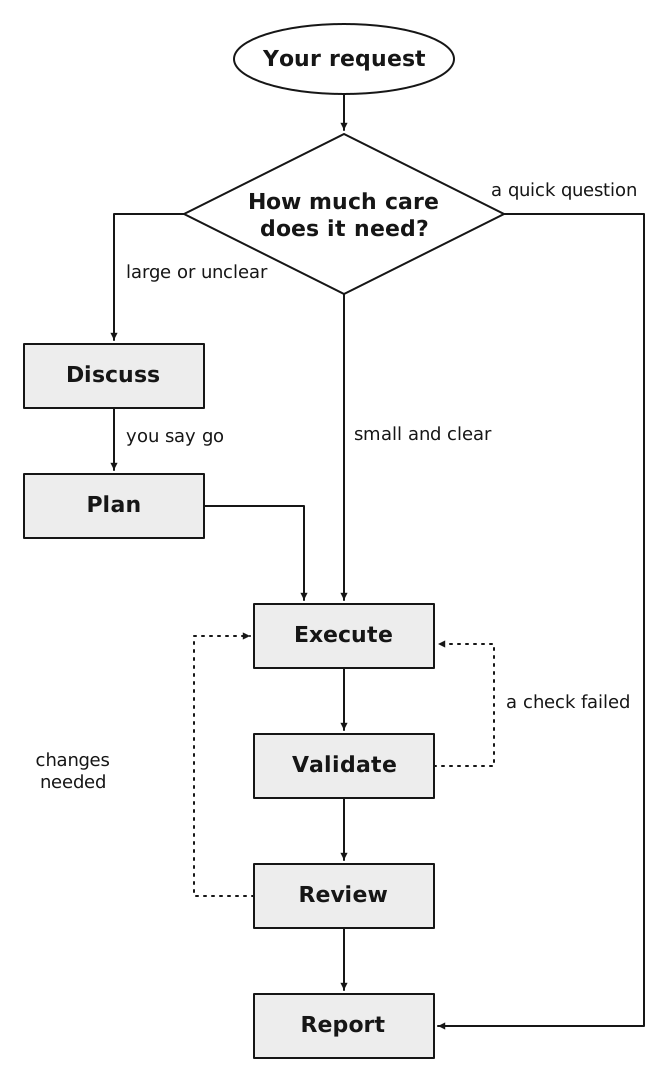
The same flow, step by step:
- Agentville decides how much care your request needs.
- A large or unclear request starts in Discuss. Once you say go, it moves to Plan and then to Execute.
- A small and clear request goes straight to Execute.
- A quick question goes straight to Report.
- After Execute, the work goes through Validate and Review, then to Report.
- When a check fails in Validate, or Review asks for changes, the work goes back to Execute.
The dotted arrows are loop-backs: when a check fails or the review asks for changes, the work goes back to Execute and is checked again. After three rounds, Agentville stops and reports what is still open, rather than going round forever.
| Stage | What happens | What you do |
|---|---|---|
| Discuss | Claude talks the request through with you: what is in, what is out and what "done" looks like. Nothing is changed yet. | Answer its questions. When it says "All points are settled, do you have anything else to add?", add anything else or tell it to go ahead. |
| Plan | Claude writes a short plan: the goal and a list of tasks, each with a check that shows it is done. | Usually nothing; it may ask for a missing fact or a yes to a web search. Claude shows you a summary and carries on; it does not wait for approval. |
| Execute | A helper does each task in the plan. | Nothing. Claude does not ask questions from here on. |
| Validate | A different helper checks each task and keeps the evidence. | Nothing. |
| Review | Another helper reads the work against the plan and the evidence, and approves it or asks for changes. | Nothing. |
| Report | Claude tells you what was done, what was checked and anything still open. | Read it, and make any decision it lists for you. |
The first line of a reply tells you which stage Claude has just moved into, in bold, such as Stage: Plan. When a stage is repeated after a loop-back, the line says so, such as Stage: Execute (2nd loop-back).
The helpers
The Claude you talk to leads the request but does not do the work itself. It hands each task to a helper, called an agent, that has one job. Each helper reports back in a fixed shape, so Claude always knows what came back.
| Helper | Job |
|---|---|
| Lead (the Claude you talk to) | Runs the whole request: picks the stages, hands out the tasks and writes to you. In Claude Code this lead can be an agent called pod-lead, when you start Claude Code with it. |
| Worker | Does the work: writes, edits, looks things up in your files. |
| Validator | Checks that the work does what it should, and keeps the evidence. It never changes the work itself. |
| Reviewer | Reads the finished work against the plan and the evidence, and gives a verdict. |
| Scout | Looks things up on the web, but only when you have said yes. |
Agentville also picks how much thinking power each helper gets, so simple tasks stay quick and hard tasks get more care.
When it asks you questions
Agentville asks questions early and then gets on with it.
- In Discuss, it asks as many questions as it needs to understand the request.
- In Plan, it asks only for a fact the plan cannot do without. It never asks you to approve the plan.
- From Execute on, it asks nothing. Anything that needs you, such as a gap, a blocker or a choice, goes into the final report for you to decide.
There are two things it always asks about first:
- Searching the web. Agentville does not search the web or send a scout without a clear yes from you. It names the questions and the websites it wants to use, and your yes covers only those.
- Anything you cannot undo. It will not publish, send, delete, merge or pay for anything unless you asked for that exact thing, in your own words.
Where its notes go
When Agentville works on files, such as in Cowork, it keeps its notes, plan and report for each request in a folder of its own. You do not need to look there; the report tells you what you need.